

Introduction
MacBook Air and MacBook Pro are two of Apple’s most popular models. They can seem to look very much alike at first, but they are aimed at different categories of users. One is more suitable for light work and the other for heavy work. In this article, we are going to examine the key distinctions between them and assist you in selecting the one that would best suit your needs.
Quick Specs Comparison
So here is a brief run down of what each laptop offers:
Air:
- Apple M2 or M3 chip
- Up to 24GB RAM
- No fan (fanless design)
- Up to 2TB of storage
Pro:
- M3, M3 Pro, or M3 Max chip
- Up to 128GB RAM
- Active cooling system (with a fan)
- Up to 8TB of storage
MacBook Air is a perfect machine to use in everyday activities browsing, emails and video watching. The Mac Book Pro is faster and suitable when doing creative jobs such as video editing or software development.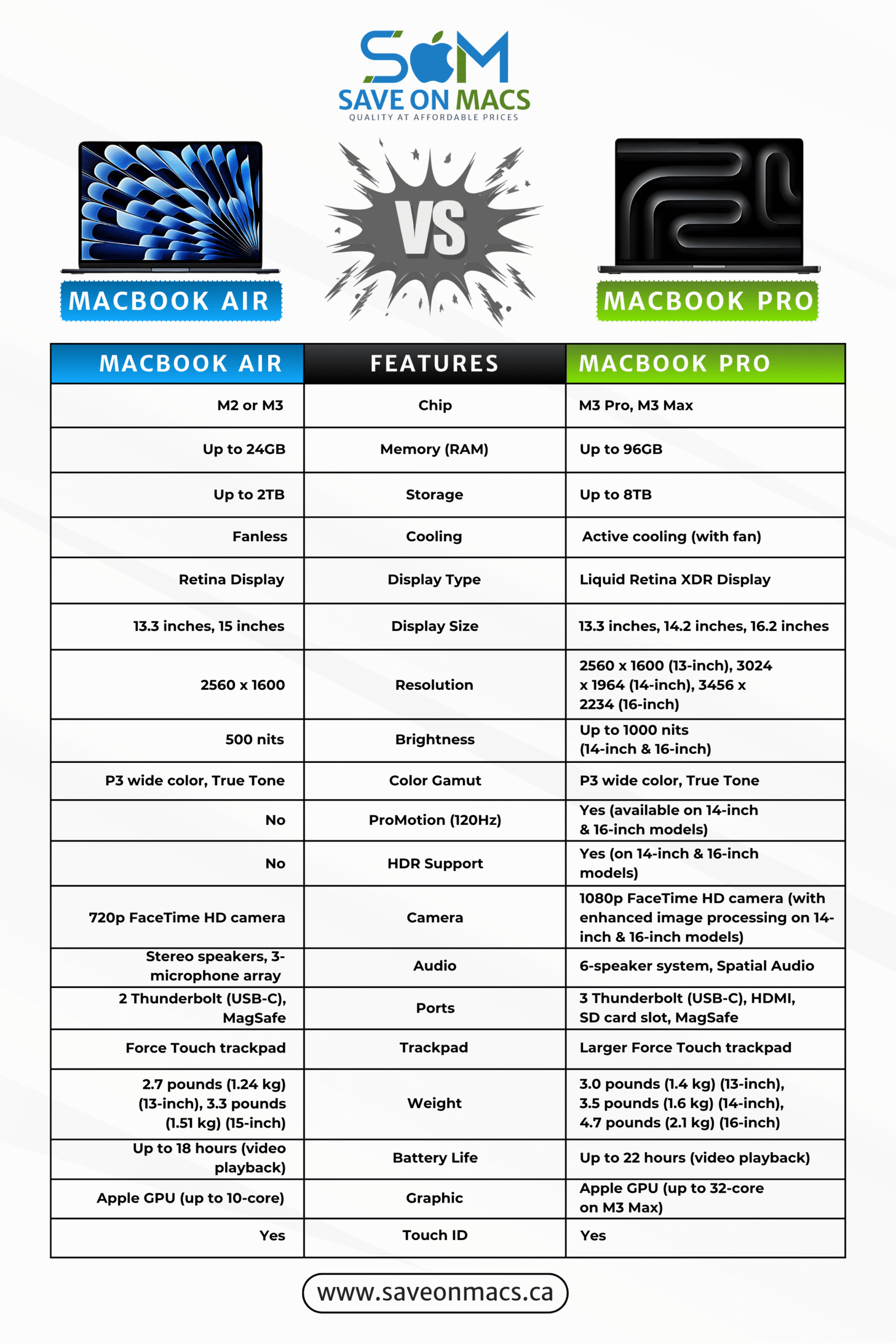
Design & Build Quality
MacBook Air:
- The 13-inch model is smaller and lighter, especially.
- Simple to put in a bag or backpack
MacBook Pro:
- The fan and extra ports make it thicker and heavier.
- Has extra ports for connecting.
The laptops are both of very good quality in terms of metal finishing. The MacBook Air is great in terms of its portability and the MacBook Pro is more powerful and versatile. Both of them should feel sturdy in the hand regardless of a size aspect.
Display Comparison:
Here’s a quick overview of the screen differences between the two laptops:
Air:
- Can be as bright as 500 nits
- Works nicely at home or in sunlight.
Pro:
- Screen that is brighter, up to 1000 nits or more
- Better scrolling
The two laptops have high quality displays but the MacBook Air is more convenient in its day to day use with its bright and clear screen. But, in case of the photo or video editing or a smoother and brighter screen, the MacBook Pro wins with its brighter screen and ProMotion technology.
Performance
Here’s a quick look at the performance differences between the two laptops:
Air:
- powered by the M2 or M3 chip
- Quick and useful for regular chores including writing papers, accessing the web, watching movies, and doing minor editing
Pro:
- It uses newer versions of the M3 chip.
- Has a fan to keep things cool when they’re working hard
- It fits best when it comes to tough work e.g. music editing, video editing and 3D models and app development.
Both the laptops have fast and less power consuming M-series Apple processors. However, when more tasks are needed such as editing, modeling, and even app development, a more powerful machine such as MacBook Pro with a more advanced M3 chip and cooling system should be selected.
Battery Capacity
Here is a short comparison between battery life of the two laptops:
Air:
- Depending on what you do, the battery will last 15 to 18 hours.
- It will last a whole day of work without a charge being necessary
Pro:
- With the 16-inch model, you can play videos for up to 22 hours, which is a longer battery life.
- An excellent choice for long working days
Both of the laptops take advantage of the performance of the smart M-series chips made by Apple, which supports the great battery life. The MacBook Air has the adequate battery to last through a full working day and the MacBook Pro goes a step further, even the battery has more life in it which will come in handy when there are long flights or when work needs to be done.
Multimedia:
Here is a short comparison between multimedia of the two laptops:
Air:
- Direct communication with a clear microphone
- Excellent speakers with audio space
- Video calls with a 1080p camera
- Excellent for films, music, and Zoom meetings
Pro:
- Microphones are good enough for professional use
- Six speakers for louder and clearer sound.
- 1080p camera with better picture processing
- It is ideal for anyone who is making videos, recording sound or an audiophile
The two laptops are top-notch in terms of multimedia and the MacBook Pro goes an extra mile in providing professional level microphones, speakers and better camera output.
Keyboard, Trackpad & Ports
Both Models:
- Identical Magic Keyboard, simple and comfortable for typing
- The trackpad in the MacBook Pro is responsive and it is easy to navigate the keyboard and use the hands.
The experience of typing on both the MacBook Air and pro is brilliant with the Magic Keyboard and many sensitive trackpads. The MacBook Pro, however, has more ports such as HDMI and a plasticky SD card reader, which makes it a superior laptop in the terms of people who might require greater range of connectivity choices with its outside drives, cameras, or monitors. The MacBook Air is less exhaustive and less capitalized on in the number of ports but it also has what one needs to use daily.
MacOS Experience: Features & Software Optimization
Air:
- Has all the features of macOS
- Has Universal Control, AirDrop, and Stage Manager
- Works great with Apple hardware
Pro:
- Has Universal Control, AirDrop, and Stage Manager
- Better in case you’re using softwares like Xcode and Final Cut Pro
Both the MacBook Air and MacBook Pro operate on macOS which means both provide exceptionally great integration with Apple products that facilitate a seamless and efficient working experience. Both laptops will enable you to have smart features like the Stage Manager, AirDrop, and Universal Control. Nonetheless, the MacBook Pro is better in heavier, more demanding tasks, like video editing with Final Cut Pro or app development with Xcode and is perfect when it comes to working professionally. The daily tasks are almost similar in the two laptops.
Prices and Configurations
Here’s a quick overview of the pricing differences between the two laptops:
Air:
- Cheap with fair prices
- For most users, the base model is a great deal.
- Storage and RAM that can be expanded, and it’s still cheaper than the MacBook Pro.
Pro:
- Higher pricing because of more power and features
- Offers a better screen, more ports, and a longer battery life
- It is worth the difference in money in case you need additional storm power and extras.
The MacBook air is an affordable machine but with very good value to users who do not require a lot of power but want to have a good quality laptop. The MacBook Pro is more expensive, but with extra power, superior screen, more ports, and longer battery life and as such is suited to power users who want greater performance. MacBook pro is also a good long-term investment because it maintains its value in the long run.
Which MacBook Should You Buy?
Looking at all the differences, here is a general overview depending on your needs.
For Students
The students should use the MacBook Air. It is lightweight, fast to study, and the battery life is excellent. No matter whether you write papers, attend online classes, or watch YouTube, the Air does everything.
For Creators & Developers
Video editors, artists, musicians, and developers will require more power. The MacBook Pro would be ideal here. It has more powerful chips, better graphic card and it does not lag during heavy operations. It is professionally oriented.
For Business & Travel
The MacBook Air is good if you’re traveling more, because it’s very thin and lasts a long time. If your work is heavy or you have to work with many connections, then the MacBook Pro is better. It gives you more power and more outlets.
Final Thoughts: MacBook Air vs. Pro Who Wins?
Purchase the MacBook Air in case you desire a light, quick, and cheap computer you can use on a daily basis. Purchase MacBook Pro in case you require greater power to create or attain professional work. Whichever you select, you are going to receive the high quality Apple laptop that will serve you several years.